Guide
Look (right-click) opens src/bar.c:12; Exec (middle-click) runs make.
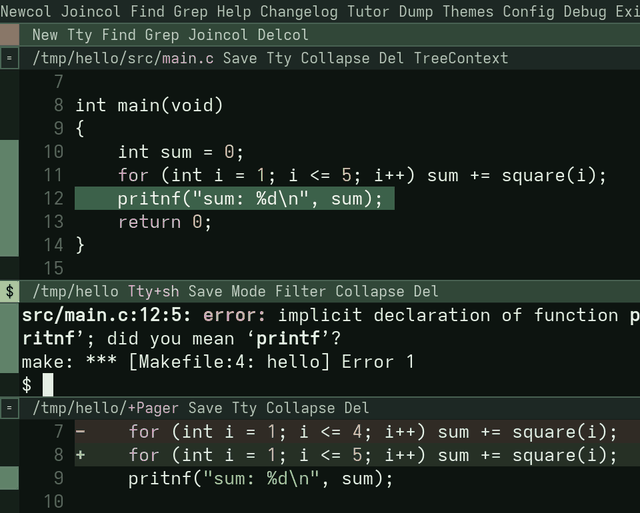
- the workspace tag: words for the whole session
- a column’s tag
- a pane’s tag: its path, then its words
- the box: the pane’s mode, and the handle to drag it
- the body: here a file, below it a terminal
- the scrollbar: how much of the body is in view
Words you'll see
- the pane with the keyboard
- where your keys go; one pane at a time
- the session’s directory
- where pardes started, or the directory
pardes DIRnamed; workspace and column tags run there - active column
- where the next new pane goes (below)
- command pane
- a terminal that runs one command line and shows its output
+names- panes pardes makes, named in their directory:
+Newa scratch (text with no file yet),+Searcha listing of places,+Pagerpaged text,+Errorsoutput,+Unsavedthe panes holding unsaved text - serial
- a pane’s number, never reused: the
3in@p3:12and in 9P paths - message row
- the line where pardes says what happened, and asks: answer a prompt (a search,
Save’s path) with Enter, cancel it with Esc
Modes
Each pane keeps its own mode. The box left of its tag shows it.
| normal | keys move and select; an edit acts on the selection. File and PDF panes start here, and so does a terminal from Altn. |
| ^ insert | keys type. i a o and the rest enter it. |
| $ raw, terminals only | keys go to the program. A terminal from Tty, the shell a bare pardes starts with, and a command pane start here. |
Ctrlb switches a terminal between raw and normal. In normal, its text is a page to move over and copy from. Mode in the tag steps raw, normal, insert.
| normal | Esc: back to the previous pane (Last), unlike helix. ShiftEsc: the same. |
| ^ insert | Esc: back to normal. ShiftEsc: out of insert and back to the previous pane. |
| $ raw | Esc: to the program, except at a shell prompt with nothing typed on it, where it goes back to the previous pane. ShiftEsc: always back. Either way the terminal stays raw. |
| a PDF | Esc: clears the selection and the search highlights. ShiftEsc: back to the previous pane. |
In acme, Esc selects the text typed since the last click; here it leaves insert mode, or goes back a pane.
ShiftEsc needs the kitty keyboard protocol or the GUI. Elsewhere it is a plain Esc. The previous pane is the last one you jumped from, else the next pane down the column.
| Ctrlw h | the keyboard to the pane on the left; j below, k above, l right |
| Ctrlo Ctrli | back and forward through the places you jumped to (the jump list), this file’s first: another file’s only once it has none left that way (JumpScope all: every place in order) |
Raw mode sends almost every key to the program. Leave it (Ctrlb) before Ctrlw or Altn.
The mouse
| left-click | select; a click puts the cursor there and gives the pane the keyboard. In a tag it starts typing, in insert mode. A double click selects the word; at a line’s start or end, the line; just inside a bracket or quote, up to its match. |
| middle-click | Exec: a builtin word runs, anything else is a shell line. |
| right-click | Look: open the file, address, directory or URL, else find the word’s next place. |
| hold left, click middle | cut the selection |
| hold left, click right | paste over it |
| hold left, click middle, then right | copy |
| Alt-click (Option) | middle-click, sweeps too, for one button or a trackpad; in a terminal too |
| Super-click (Cmd) | right-click not in a terminal, which never passes Super |
| Ctrl-click | the language server’s definition |
A program that takes the mouse gets the plain click.
right-click on src/bar.c:12:5: in a compiler’s error opens src/bar.c at line 12, column 5. A click takes the word under it: letters, digits and . - + / : @ _ ~, less a trailing :. Drag to take exactly what you swept. In normal mode Enter is Look and Tab is Exec.
A builtin’s argument: sweep Find conf with middle-click, or select conf, then hold middle, click left on Find.
x y then p copies a line below. Every pane shares the registers. SPCy and SPCp use the system clipboard.
Tags
Newcol Joincol Find Grep Help Changelog Tutor Dump Themes Config Debug ExitNew Tty Find Grep Joincol DelcolSave Tty Collapse DelA tag is text with undo. Type make into one and Exec it, or delete the words you never use. Any word runs from any tag: Exit in a pane’s tag quits too.
| : | the keyboard to the tag, on Save the first time; Tab runs it, : comes back |
| edit the path, Enter | the next Save writes to the new path |
Collapse | folds the pane to its tag |
| drag the box | up or down resizes; onto another column moves the pane |
Where commands run and panes go
middle-click on make runs it with the Shell setting’s -c. Where it runs depends on where you clicked:
| a terminal’s text or tag, at a prompt with nothing typed | typed into that shell, in its current directory |
| any other pane’s text or tag | a command pane in that pane’s directory, in the last column |
| a column’s tag | a command pane in the session’s directory, in that column |
| the workspace tag | a command pane in the session’s directory, in the last column |
A file’s text and tag run in its directory: make from README at the project root is right, from src/main.c it is not. The keyboard stays where it was. The command pane’s tag ends in running, then exit N:
Kill Save Collapse DelClick into the command pane: n selects the next file:line, Enter opens it, and n from there goes on to the next error. A finished command pane is in normal mode, so x y copy from it at once. The next command for that directory reuses it. Kill make stops the commands pardes started with make. Save or Del in a column tag acts on that column’s pane with the keyboard, else its first.
Every other new pane goes into the active column: where you last typed or left-clicked, or where the last new pane went. The new pane takes the keyboard. A listing is the exception: it opens below the pane that asked, which keeps the keyboard, so n N walk the listing. right-click on a file open in another column jumps there, but the next new pane still lands in the old column. Placement pardes picks other rules (→ Reference: Placement).
To open beside: Newcol, then Look a file name typed in its tag opens it there; Altc moves a pane into a new column.
Closing a column’s last pane leaves it empty; Delcol and Joincol take columns away. Closing the session’s last pane quits pardes.
Look
notes.txt | opens it, or goes to the pane already showing it |
notes.txt:12 | line 12 |
notes.txt:/TODO/ | the next match of TODO |
src/ | a pane listing it, as acme’s directory window: a Look at an entry opens it, .. goes up, Get reads it again (DirLook terminal: ls in a terminal there) |
https://ziglang.org | the browser, through xdg-open (open on macOS); there is no plumber |
Enter does the same from the keyboard; the other address forms are on the cheatsheet. A relative path is found in the directory of the pane the Look came from, then of each pane on the jump list, most recent first.
/ TODO Enter | a +Search of the lines holding TODO, the cursor on the first; n N step through |
Find conf | a +Search of the files below the pane’s directory with conf in their names |
Grep TODO | a +Search of the lines holding TODO, literally, under every pane’s directory |
Unsaved panes
Del on a pane with unsaved text, its box filled ( a * in a terminal), refuses once, saying 1 unsaved pane — Del again to discard, and lists the pane in +Unsaved; Del again discards it. Exit (or SPCq), Restore and Delcol refuse once the same way. SPCd between two panes also asks which takes the rows: k above, j below.
Terminals
Tty+bash Save Mode Filter Collapse DelTtyopens a terminal in the pane’s directory, Altn one in the session’s directory;Tty+bashpicks the shell.Delcloses a terminal and its shell at once, running or not, and a shell that exits closes its pane.Savewrites the scrollback to a path it asks for.Filtermaps the program’s colours through the theme.Petsciidraws a program’s images as glyph art instead of pixels.- In raw mode Ctrl-V types what you yanked, Ctrl-Shift-V the clipboard.
- A program that tracks the mouse gets left-click and the wheel; middle-click and right-click stay pardes’s. Hold Shift to swap.
Replpythonin its tag makes middle-click on a.pypane send the text to that REPL.git logandmanopen in a+Pagerpane (→ Setting up your environment: A pager).
Reviewing diffs
git diff run as a command, or a .diff or .patch opened, is drawn as a diff, each hunk in its file’s language. right-click on:
diff --git, ---, +++ | the file |
@@ -3,7 +3,8 @@ | the hunk’s first new line |
a line’s +, - or space | that line in the new file |
pardes FILE and --wait
In a pane’s shell:
pardes notes.txt          open it here and return at once (acme's B)
pardes --wait notes.txt   return when that pane closes (acme's E)
A file not there yet opens empty, and Save creates it. --wait makes pardes an EDITOR (→ Setting up your environment: pardes as your editor); refusals and --nested are in the reference.
Keys
| w d | select a word, delete it: motions select, edits act on the selection |
| x, v, ; | select the line; extend; collapse to the cursor |
| s | a cursor per regex match; every edit acts at each |
| /, n N | substring search; step through everything Look would open, across panes |
| gl | line end |
12G | line 12; a bare G does nothing |
| SPC? | Help: every builtin, with its leader path and keys; SPC w ? only the paths under SPC w; Tutor (SPCht) practises them |
gd gr, SPC l | the language keys, once a server is installed (→ Setting up your environment: Language servers) |
The keys are helix’s, and helix’s keymap is their full reference. Where pardes differs (Esc leaving the pane, the SPC paths, Ctrlw, Ctrlb), this guide and the cheatsheet (→ Cheatsheet) say so.
Sessions
pardes --detach=work &      a session with no screen of its own
pardes --attach=work        show it here
The session owns the panes, shells and files; frontends come and go, and all of them see the same screen. Attach work (SPCsa) switches this window to it; Detach (SPCsD) leaves it running.
Config
Config (SPCfc) opens the startup file, ~/.config/pardes/init: one builtin a line, run at start, # a comment.
Theme atelier
Shell zsh
# Placement acme is the default; Placement pardes picks the other rules
DumpConfig opens every live setting as the line that sets it. Dump saves the workspace and Restore brings it back (what a dump keeps is in the reference). Keys are compile-time, in src/config.zig.
Questions
- Why not helix and tmux, or acme?
- helix and tmux edit and run shells well, but their text is inert. acme makes text the interface and is modeless by design, with win for shells and page and the plumber for documents. pardes keeps acme’s text as the interface and trades the rest for helix’s modal keys, a VT terminal and PDFs in a pane. What changes for acme users and scripts is in → Reference: Coming from acme.
- Does it run inside tmux?
- Yes, as in any terminal. Where tmux does not pass kitty’s protocols, ShiftEsc is a plain Esc and images draw as glyph art.
- Does my helix config carry over?
- No. The keys are compiled in (
src/config.zig);~/.config/helixis not read. - How do I quit?
- SPCq, or
Exitin any tag. - What does “pardes” mean?
- The name of the four levels of reading a text in rabbinical exegesis (Wikipedia).